ONLINE · ALL 50 STATES
Your U.S. tax return,
prepared online in English or Japanese.
Apply, pay, upload documents and track progress, all on this site. Answer a few questions to see your fee right away (base fee from $600), and an IRS Enrolled Agent prepares and e-files your return. Have a question? Ask our AI for an instant answer, or ask our tax professional.
See your fee now → 💬 Ask a question (AI or tax pro)No office visit or phone call needed. We work by email (info@cltny.com).
Before
Did any of this sound familiar?
If even one rings a bell, leave it to CLT NY INC.
See more ways it’s easier (4)
An IRS Enrolled Agent prepares your return, in English or Japanese. Start by checking your fee.
See your fee now → 💬 Ask a question (AI or tax pro)Who We Help
Who we prepare returns for online
Our full services and fees are on U.S. Individual Tax Returns; this page explains how the online process works.
Expats on assignment (L, E, H visas)
Form 1040 and state returns, including arrival and departure years and salary paid from Japan.
Green card holders and U.S. citizens
Form 1040 and state returns, plus FBAR and Form 8938 for Japanese accounts and PFIC reporting for Japanese funds.
FBAR for Japanese bank accounts →Moving back to Japan
The dual-status return for your departure year, your final state return, and 401(k) or RSU income after you leave.
Living in Japan
Form 1040 for U.S. citizens and green card holders, and Form 1040-NR for U.S. rental property or accounts, filed from Japan.
Live in NJ, work in NY
New York IT-203 and New Jersey NJ-1040, both state returns together.
Switching from another preparer
We pick up from last year’s return. 50% off last year’s fee (up to $500, first year).
Switch campaign →Fees
Fee examples
The base fee is $600 (Form 1040 and one state, including W-2, interest, dividends and dependents), plus the items you need. Answer a few questions on the application page to see your total; it is fixed before we start. If your documents show something different, we talk with you first, and the fee never goes up without your OK.
See the full fee list for stock sales, rental property, self-employment and more. The fee does not depend on your refund.
Your Tax Professional
What your Enrolled Agent takes care of
Applying, paying, sharing documents and tracking progress happen online. The return itself is handled by a licensed tax professional.
Preparation and final review
We prepare your federal and state returns from your documents and questionnaire, and an Enrolled Agent reviews them.
We walk you through it
Before you sign Form 8879, we explain your refund or balance due and the return itself, in English or Japanese.
E-filing
Once you approve, we e-file your federal and state returns and confirm they are accepted.
IRS and state notices
Enrolled Agents can represent you before the IRS. We can also answer notices you receive.
Our AI answers general questions about fees, the process and terms. Whether you need to file and how much tax you owe are decided by your Enrolled Agent.
How It Works
The online process, on the actual screens
These are the actual screens. You can do it all on your phone.
Compared with the usual way
The usual way
Waiting and back-and-forth, again and again
- 📧Contact the firm to ask the price
- ⏳ Wait for a reply
- 📞A call or meeting to go over details
- ⏳ Wait for a quote
- 📄A PDF or Word questionnaire arrives
- 🖨️Print and write, or edit the file
- ❓A question doesn’t make sense
- 📞Email or call to ask
- ⏳ Wait for a reply
- ✍️Copy numbers from W-2s and 1099s
- 📎Email attachments or mail documents
- ☎️“How is my return coming along?”
- ⏳ Wait for a reply
CLT NY INC.
No waiting, all on this site
- 📱Answer questions, see your fee
- 💳Approve and pay online
- 📝Questionnaire on screen: copy last year’s answers, forms read for you, ask the AI
- 👀Track your status on your page, with email updates
- ✅Review and e-file
On the actual screens, step by step
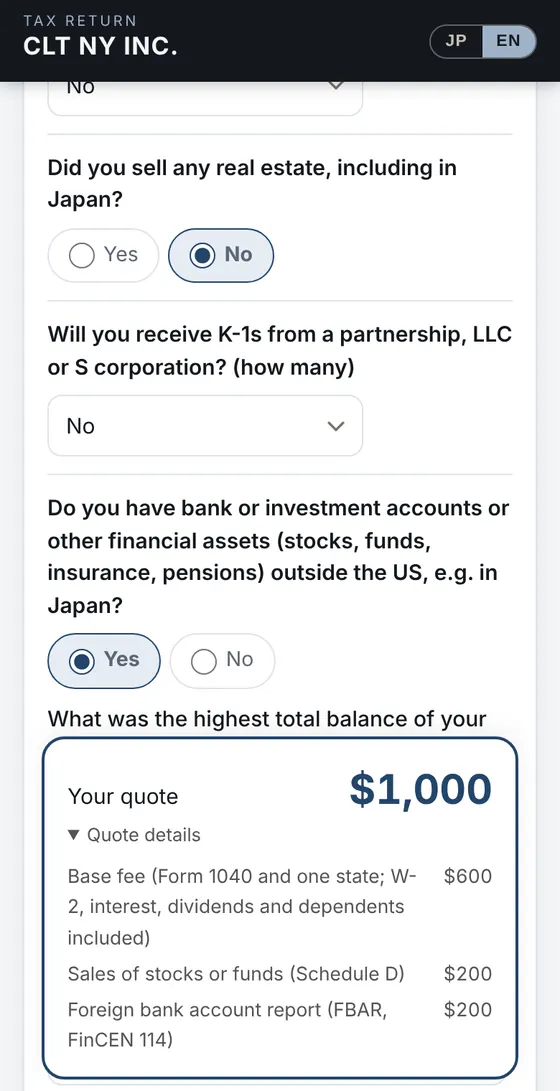
Answer questions, see your fee
Answer a few questions about your filing status, state and income. The total appears right away from our price list, with a breakdown.
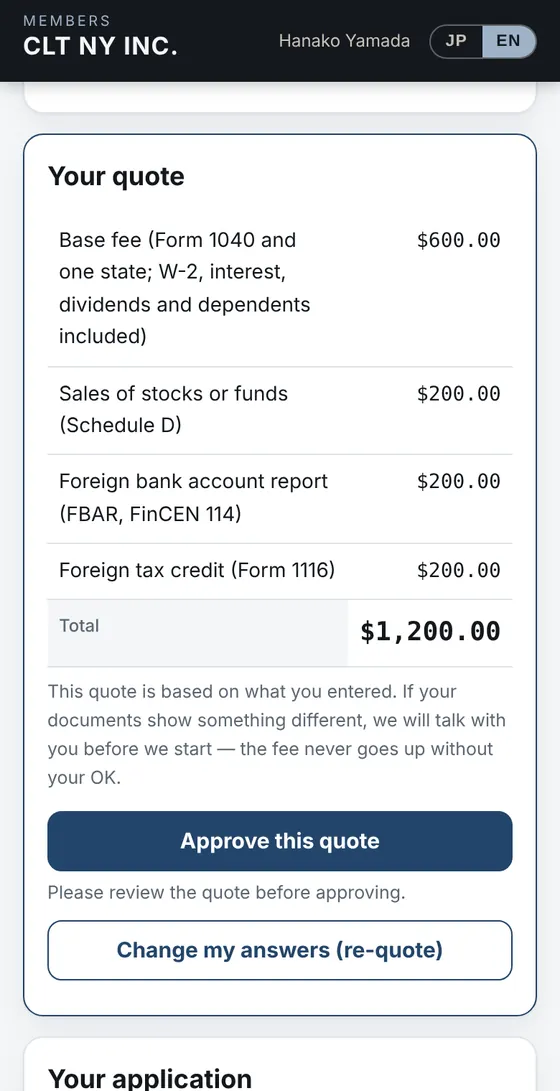
Apply with your name and email, then approve
No password. Sign in with a code we email you, review your quote and approve it. Before approving you can still change your answers.
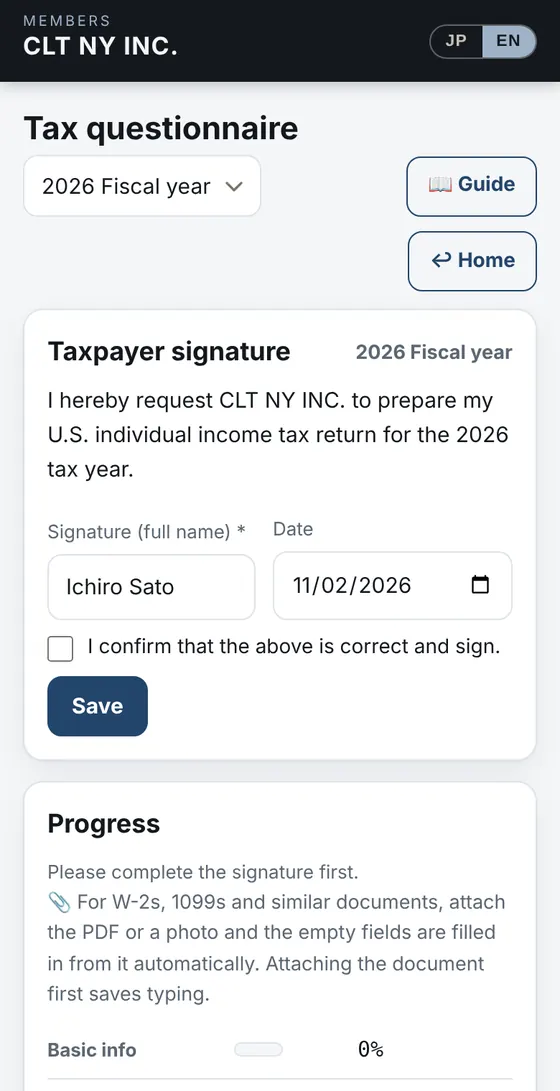
Pay, then the questionnaire and documents
After paying online, fill in the tax questionnaire and upload W-2s, 1099s and other documents as PDFs or photos. Your answers from applying are already filled in.
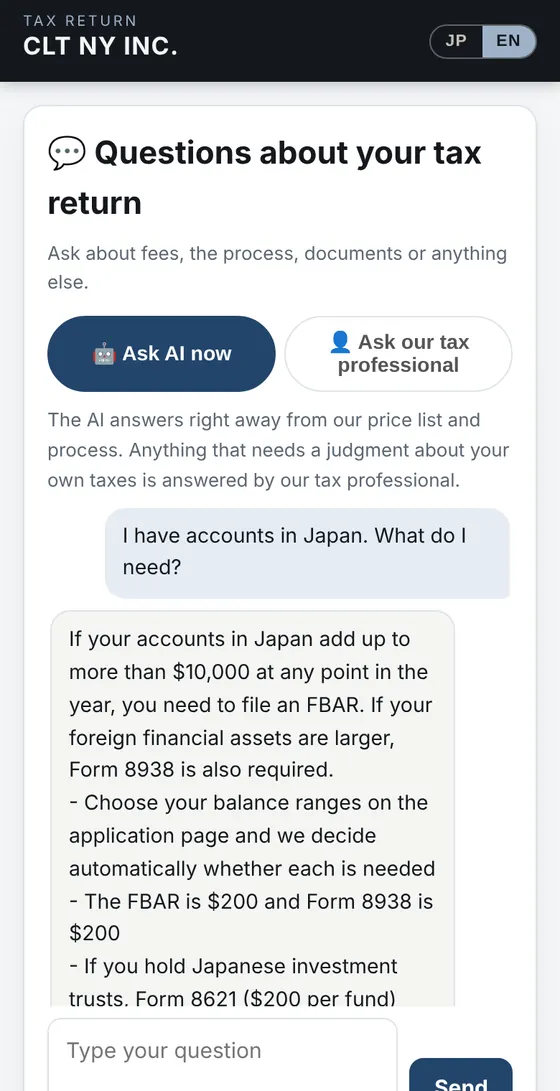
Ask anything, right then
Our AI answers from our price list and process. Anything that needs a judgment about your own taxes, such as whether you must file or how much you owe, goes to our tax professional.
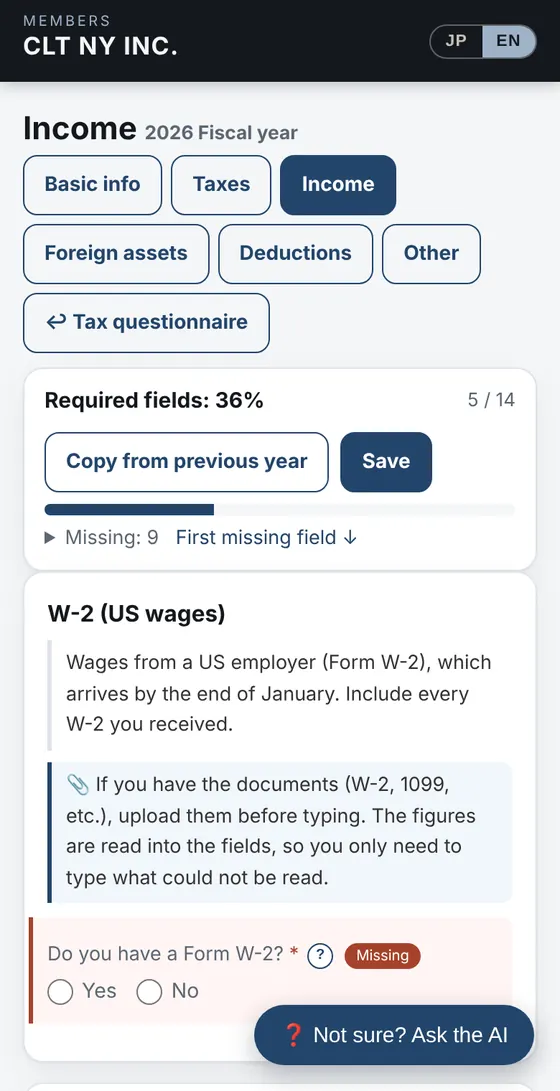
The questionnaire, starting from last year
“Copy from previous year” brings in last year’s answers. Every question has an explanation and a “?”, and “Ask the AI” helps when you are unsure. Attach your forms and the numbers are read for you.
When your return is ready we go over it with you, and e-file it once you approve.
After You Submit
After you submit the questionnaire, track your U.S. tax return on your own page
No need to email and ask how it is going. These are the actual client screens (a 2024 sample).
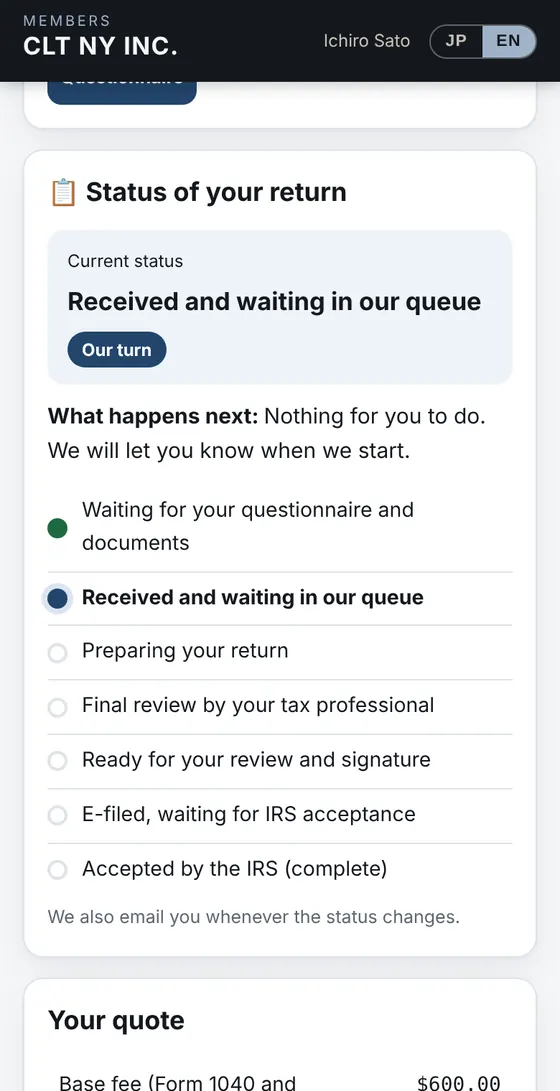
Received and waiting in our queue
Once you submit the questionnaire, your return is received. It is our turn, so there is nothing for you to do.
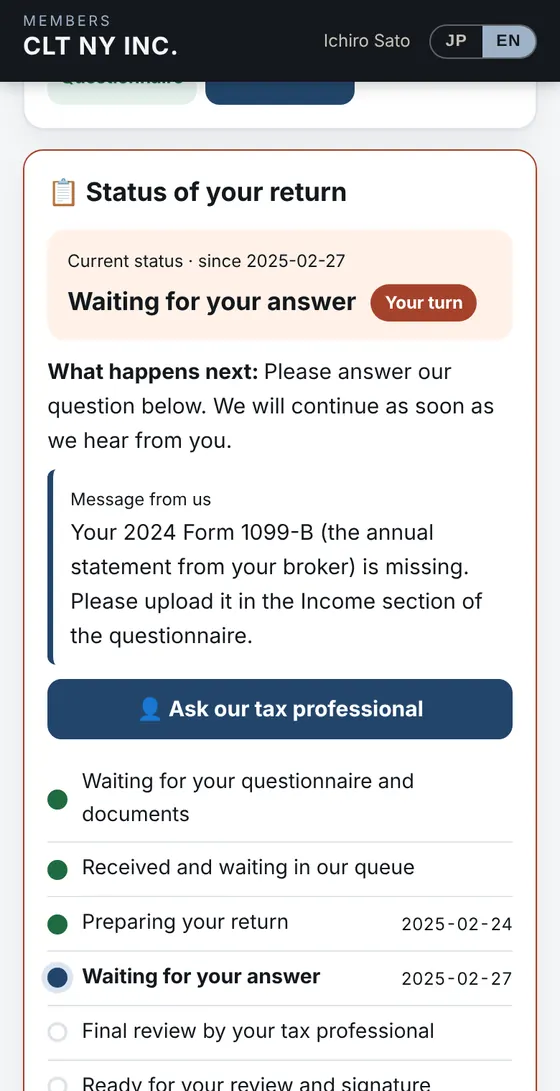
Waiting for your answer
If we need something, it becomes your turn, with a message from us. You can reply right from your page.
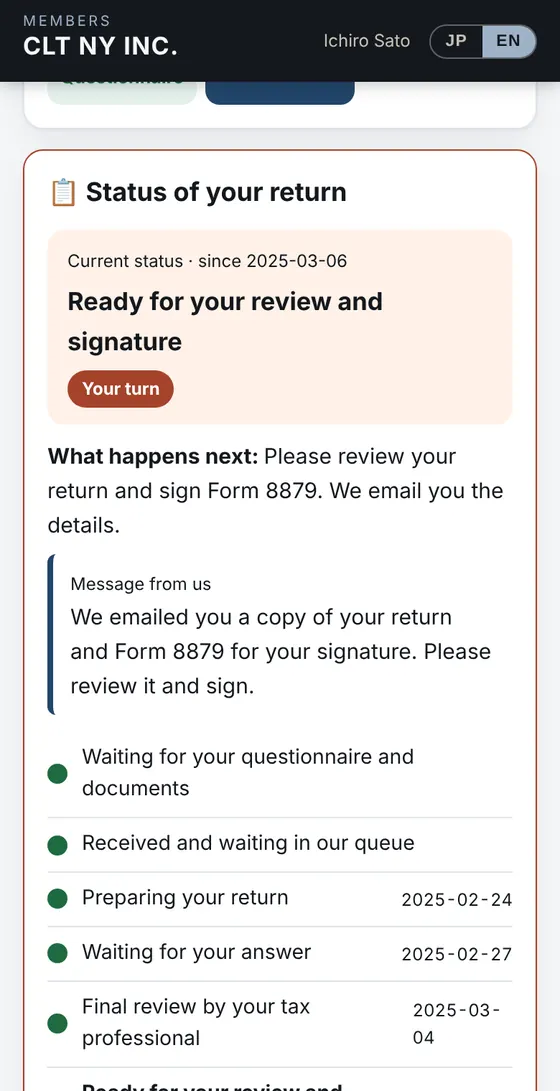
Ready for your review and signature
When your return is ready, please review it and sign Form 8879. The dates of each earlier stage are kept.
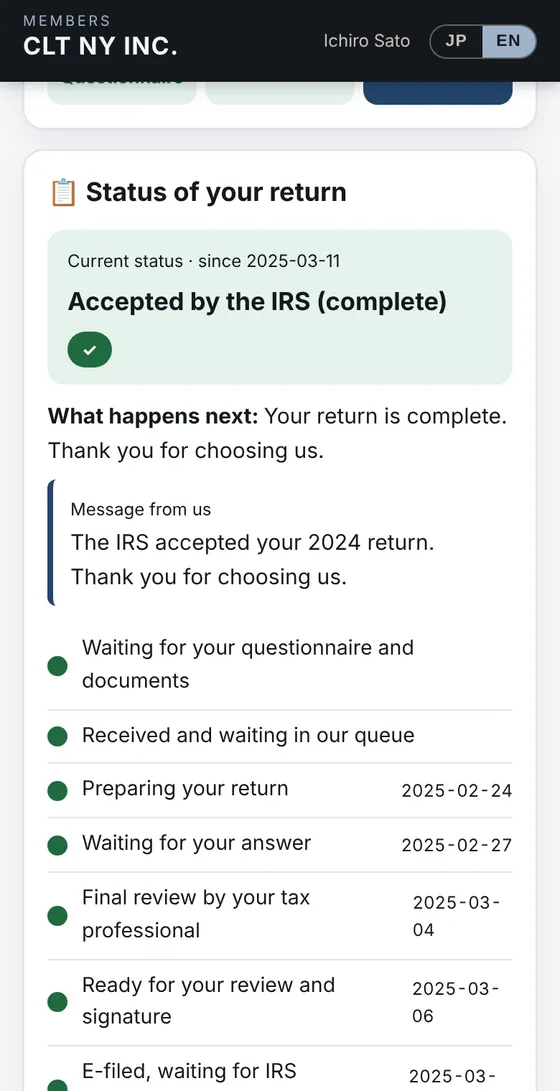
Accepted by the IRS (complete)
Once we e-file and the IRS accepts it, you are done. You can always look back at when each stage happened.
Stages: waiting for your questionnaire and documents → received → preparing → (waiting for your answer) → final review → ready for your review and signature → e-filed → accepted by the IRS
✉️ An email every time the status changes
Subject:[CLT NY INC.] Your tax return: Final review by your tax professional
Nothing for you to do. Your IRS Enrolled Agent is reviewing the return.
You can check the status any time here.
https://app.cltny.com/apply/me
Every Year After
Your tax return from the second year: enter only what changed
Your answers and documents stay on our server, so next year you start from last year’s answers instead of from scratch.
The usual way
CLT NY INC.
Yes/no questions are answered every year because they can change. You attach your W-2s, 1099s and other forms each year (the numbers are read for you).
What stays on our server
Peace of Mind
Online, and still safe to trust
How we handle payment, documents and fees.
Payment on the payment provider’s page
You enter your card on the payment provider’s page. Card numbers are not stored in our system.
Documents seen only by you and us
Only you (signed in) and our firm can open the documents you upload. Everything is encrypted in transit (https).
A written record
We communicate by email and on your application page, so there is always a record of what was said.
See also: U.S. individual tax returns · How fees are set · Switch campaign
Frequently asked questions
Q. What if I don’t understand a questionnaire question?Every question has an explanation and a “?” button, and you can ask the AI right then with “Ask the AI” at the bottom right. Your answers and personal details are not sent to the AI. You can also ask our tax professional from the site.Q. Can I really hire you without visiting or calling?Yes. Applying, payment, the tax questionnaire and documents are all online, and we work by email. We handle all 50 states and clients living in Japan.Q. Can I ask questions before applying?Yes. Use “💬 Ask a question” on the application page to ask our AI or send a question to our tax professional. You do not need to apply first, and we reply by email.Q. Can I do everything on my phone?Yes. You can apply and pay on your phone, and upload documents as photos taken with your camera.Q. I use another preparer now. Can I switch?Yes, and you do not need to contact your current preparer. Our switch campaign takes 50% off last year’s fee (up to $500, first year).Online
Answer a few questions and see your fee
An IRS Enrolled Agent prepares your return, in English or Japanese. Questions before applying are welcome.
See your fee now → 💬 Ask a question (AI or tax pro)